



You stayed up past midnight for months. You rewrote chapter seven four times. You poured your story, your expertise, or your imagination onto every page, and now you're staring at a finished manuscript wondering: how do I actually get this into readers' hands?
Here's the truth most aspiring authors don't hear until they've already wasted thousands on vanity presses: you don't need a gatekeeper anymore. With the right Amazon book publishing service, your book can be live on the world's largest online retailer within 24–72 hours, earning royalties while you sleep. If you've been searching for a way to publish my book on Amazon without the confusion, the hidden fees, or the publishing industry's notorious rejection letters, this guide is written specifically for you.
At Hollywood Books Publisher, we've helped hundreds of first-time authors navigate this process, and in this deep-dive, we're pulling back the curtain on everything Kindle Direct Publishing (KDP) has to offer, including the angles most publishing blogs conveniently skip.
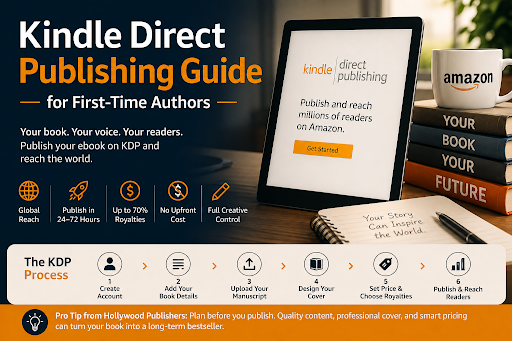
Kindle Direct Publishing is Amazon's self-publishing platform that allows authors to upload, format, price, and distribute their ebooks and print books directly to Amazon's global marketplace. Launched in 2007, KDP has since transformed the publishing landscape, enabling millions of independent authors to reach readers in over 100 countries without a traditional publishing deal.
• Global reach — Your book appears on Amazon.com, Amazon.co.uk, Amazon.ca, Amazon.in, and more
• Speed to market — Most titles go live within 24–72 hours of submission
• High royalty rates — Up to 70% on ebooks priced between $2.99 and $9.99
• No upfront cost — Publishing an ebook on KDP is completely free
• Full creative control — You own your content, cover, pricing, and publishing rights
Most guides stop at "sign up and upload." We don't. Here's the real process, including what trips up first-timers.
Head to kdp.amazon.com and sign in with your existing Amazon account or create a new one. You'll need to complete your tax information (W-9 for U.S. authors, W-8BEN for international) and add your banking details before your royalties can be paid out.
Hollywood Books Publisher Tip: Do this before your book is ready. Tax verification can take a few days, and you don't want a paperwork delay holding up your launch.
This is your book's metadata, and it matters more than most authors realize for discoverability.
• Book title and subtitle: Include your primary keyword naturally
• Series name: (if applicable)
• Author name/pen name
• Book description: This is your sales page. Write it like a marketer, not a librarian
• Publishing rights declaration
• Keywords (7 slots): These feed Amazon's internal search algorithm
• Categories (2 primary): Choose strategically; niche categories = easier bestseller rankings
KDP accepts several file formats:
| Format | Best For |
|---|---|
| .docx (Word) | Most common, easiest to work with |
| .epub | Pre-formatted ebooks |
| .mobi | Older Kindle format (still accepted) |
| HTML | Advanced users with coding knowledge |
| Print books only |
Amazon's KDP previewer lets you see exactly how your book will appear on different Kindle devices before you publish. Use it. Every time.
Your cover is your single most important marketing asset. Amazon's research consistently shows that cover quality directly impacts click-through rates on search result pages.
• KDP offers a free Cover Creator tool for basic designs
• For professional results, hire a genre-specialist cover designer
• Required dimensions: at least 2,500 pixels on the longest side, with a 1.6:1 height-to-width ratio
This is where most first-time authors leave money on the table.
KDP Royalty Options:
• 35% royalty — Available for all price points; required for books priced below $2.99 or above $9.99
• 70% royalty — Available for books priced $2.99–$9.99 in supported territories
Pricing Strategy by Goal:
• Launch & visibility: $0.99–$2.99 (lower barrier, higher download volume)
• Standard income: $3.99–$5.99 (sweet spot for most indie fiction)
• Nonfiction/premium: $6.99–$9.99 (perceived authority, higher per-sale income)
One of the most consequential decisions you'll make as a self-published author is whether to enroll in KDP Select or go wide with multiple retailers.
When you enroll in KDP Select, your ebook becomes exclusive to Amazon for 90-day periods. In exchange, you gain access to:
• Kindle Unlimited (KU) — Your book is available to KU subscribers, and you earn per page read (KENPC)
• Kindle Countdown Deals — Timed promotional discounts that still pay 70% royalties
• Free Book Promotions — Up to 5 free days per enrollment period for list-building
• Kindle Unlimited royalty pool — Monthly payout shared among all enrolled books
Best for: Genre fiction authors (romance, thriller, sci-fi/fantasy) with series; authors building readership quickly.
Going wide means your ebook is available on Amazon and other platforms simultaneously: Apple Books, Kobo, Barnes & Noble Nook, Google Play Books, and more.
Best for: Nonfiction authors, authors with established platforms, those who want to reduce Amazon dependency long-term.
At Hollywood Publisher, we typically recommend KDP Select for debut authors in fiction, then reassess after the first 6–12 months of data.
This is where we separate strategic authors from those who just hit "publish and pray."
If you've enrolled in Amazon's Brand Registry or are using Author Central, you can add A+ Content to your book's product page — rich media sections with comparison charts, custom imagery, and editorial callouts that dramatically increase conversion rates.
Your Author Central profile is essentially a free author website hosted directly on Amazon. It includes:
• Author bio with photos and social links
• Aggregated editorial reviews
• Reader Q&A section
• Bibliographic control of all your titles
Most indie authors set this up once and ignore it. Actively maintaining it signals authority to both readers and Amazon's algorithm.
Since 2021, KDP has offered hardcover printing in addition to paperback. Hardcovers command higher price points and significantly boost your book's perceived value, especially for nonfiction, gift books, and illustrated titles.
Kindle Create is Amazon's free formatting tool, but buried inside it is a feedback mechanism that lets early readers highlight passages and flag issues before wide release. Most authors never activate this feature.
• Payment schedule: KDP pays approximately 60 days after the end of the sales month (e.g., January sales paid in late March)
• Payment threshold: $100 (check), $10 (direct deposit/EFT), $10 (wire transfer)
• Currency: Paid in your local currency; exchange rate fluctuations affect international sales
• Delivery costs: For 70% royalty titles, Amazon deducts a small delivery fee based on file size. Keep your ebook file lean.
Avoid these costly errors that Hollywood Books Publisher sees again and again:
• Skipping the KDP previewer — Formatting errors look unprofessional and damage reviews
• Using generic categories — Browse Amazon manually to find low-competition subcategories
• Underestimating the book description — Spend as much time on this as a chapter
• Publishing before building any audience — Even a small email list of 200 readers transforms launch day
• Ignoring print-on-demand — A paperback listing dramatically increases credibility and discoverability
• Pricing too low permanently — $0.99 signals low quality when it's not a promotion
Navigating KDP alone is possible, but doing it strategically is where authors make the real difference between 10 sales and 10,000. At Hollywood Books Publisher, we offer end-to-end self-publishing support including manuscript formatting, professional cover design, keyword research, metadata optimization, and KDP launch strategy tailored to your genre and goals.
We don't just help you publish; we help you publish smart.
Ready to take the next step? Connect with the team at Hollywood Books Publisher and let's turn your manuscript into a professionally published book that stands out on Amazon from day one.
Yes, uploading and publishing an ebook on KDP costs nothing. Amazon earns its revenue by taking a percentage of your royalties (30% at the 70% tier, 65% at the 35% tier). Print-on-demand books through KDP Print have printing costs deducted from royalties, but there are no upfront fees.
Most ebooks are reviewed and published within 24 to 72 hours. Print books (paperback and hardcover) typically take 72 hours to a week, as physical proof review is involved. If your book is rejected for quality or content issues, Amazon will notify you via email with specific reasons.
It depends. If you enroll in KDP Select, your ebook must be exclusive to Amazon for the 90-day enrollment period. However, your print book (paperback/hardcover) can be distributed through expanded distribution channels regardless of KDP Select enrollment. If you choose not to enroll in KDP Select, you can sell your ebook on Apple Books, Kobo, and other platforms simultaneously.
An ebook is a digital file delivered to Kindle devices or the free Kindle app. A print-on-demand (POD) book is a physical copy printed only when a customer orders one, eliminating inventory risk entirely. Many authors publish both formats simultaneously on KDP, which increases visibility in Amazon search and appeals to readers who prefer physical books.
For ebooks, no ISBN is required; Amazon assigns an ASIN (Amazon Standard Identification Number) automatically. For paperbacks and hardcovers, KDP will provide a free ISBN, but this ISBN is Amazon-exclusive. If you plan to distribute your print book to bookstores and libraries outside Amazon, you should purchase your own ISBN through Bowker (in the U.S.) for full distribution flexibility.
Use the form below to contact us regarding your ghostwriting concerns. Please be as detailed as possible. You may also email or call us for more information.